Home > Administration Guide > Users > Export CSV
Export CSV
This page is used for arranging the format of the CSV data.
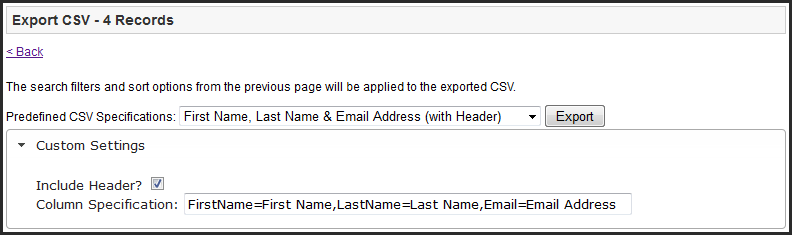
Predefined CSV Specifications - Available pre-defined data formats; either with or without a header row describing each column of information.
Export - Submit the request to the server for the CSV file to be generated. An email with a link to the CSV file download page will be sent to the requesting administrator's email address.
Custom Settings
Expand and view the Custom Settings by clicking on the text "Custom Settings"
Include Header - Toggle whether or not a header row will be included in the custom CSV file. When including column headers, Column Specification formatting will need to include the column names
Column Specification - Edit the displayed field names to be used in the CSV file header row
Note: When arranging the format for Column Specification, it is important to adhere to the syntax displayed in the 'Column Specifications' text box, after selecting the appropriate option from the 'Predefined CSV Specifications' dropdown menu.
Examples:
[user_property],[user_property],[user_property],... (No Headers)
OR
[user_property]=[name of the column],[user_property]=[name of the column],[user_property]=[name of the column],... (With Headers)
---------------------------------------
FirstName,LastName,Email,... (No Headers)
OR
FirstName=First Names,LastName=Last Names,Email=Email Addresses,... (With Headers)
User Data Property IDs
|
user_property
|
Description
|
|
ID
|
The integer ID of the user.
|
|
UserName
|
The user’s login name.
|
|
Culture
|
The user’s culture in the following format, “The format for the culture name is languagecode2-country/regioncode2, where languagecode2 is the language code and country/regioncode2 is the subculture code. Examples include ja-JP for Japanese (Japan) and en-US for English (United States). In cases where a two-letter language code is not available, a three-letter code derived from ISO 639-2 is used.”
|
|
Email
|
The user’s email address.
|
|
Comment
|
Any stored comments for the user (as entered from the Admin Control Panel > Users > Management > Account Info tab).
|
|
IsApproved
|
A Boolean value indicating whether the user is approved by an administrator to use the site. Effectively allows or prevents a user from logging in.
|
|
IsLockedOut
|
A Boolean value indicating whether the user is locked out from the site by an administrator. Effectively allows or prevents a user from logging in.
|
|
CreationDate
|
The date/time the user account was created.
|
|
LastLoginDate
|
The date/time the user last logged in.
|
|
LastPasswordChangeDate
|
The date/time the user last changed their password.
|
|
LastLockoutDate
|
The date/time the user was last locked out of the site.
|
|
LastActivityDate
|
The date/time the user last performed an activity on the site.
|
|
Newsletter
|
A Boolean value indicating if the user has “opted-in” to newsletter type communications originating from the site.
|
|
LastIP
|
The user’s IP address the last time they logged in to the site.
|
|
IsVerified
|
A Boolean value indicating if the user’s email address is verified. A verified email address is one where the system sent the user a verification email containing a unique verification token (see below) to the specified email address, and the user took action to send the verification token back to the site. This “feedback” activity proves the user has access to the specified email address.
|
|
VerificationToken
|
A random string, unique each time a user verification email is sent.
|
|
ServiceAuthorizationToken
|
A random string unique to the user, for use during web services authentication.
|
|
IsActive
|
A Boolean value indicating whether the user is active or has been deactivated. Effectively allows or prevents a user from logging in, and, when false (deactivated), inhibits the user from showing up in default User Management views.
|
|
Street1
|
The first line of the street portion of the user’s primary address.
|
|
Street2
|
The second line of the street portion of the user’s primary address.
|
|
City
|
The city of the user’s primary address.
|
|
StateRegion
|
The state or region of the user’s primary address.
|
|
ZipPostal
|
The zip or postal code of the user’s primary address.
|
|
Country.Value
|
The country code of the user’s primary address.
|
|
FirstName
|
The user’s first name.
|
|
LastName
|
The user’s last name.
|
|
<any user custom property>
|
The user property an administrator has created from the Admin Control Panel.
|
See also
| 


