Sales Invoices
The Sales Invoices Report differs from the Sales Transaction Report in that it displays the Shipping, Taxes and Buyer's Premiums.
Clicking the column title toggles "sort by ascending" and "sort by descending". To search by one or more fields, enter the search parameters into the text box below the column title.
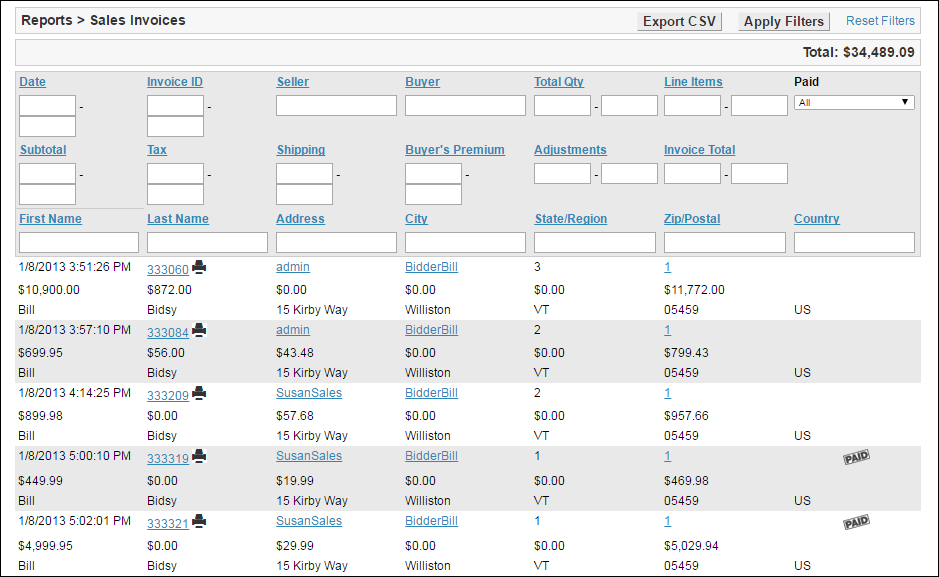
Export CSV - Download the CSV (comma separated value) file containing the sales transaction data. Filters will be applied to the CSV file.
Apply Filters - Click this button to apply any search criteria that has been entered into the field text boxes.
Reset Filters - Click this link to remove any filters and show all of the data available.
 - Click this printer icon to open a printing dialogue for that specific invoice.
 - This paid icon signifies if a sales invoice has been marked as paid or not.
| Name of Field | Type of Information | Description |
| Date | Date (Range) | Date the listing fees were charged |
| Invoice ID | Integer Value (Range) | The Invoice ID number is unique to the Invoice |
| Seller | Text | The Seller's username |
| Buyer | Text | The Buyer's username |
| Total Qty | Integer Value (Range) | The number of items on the Invoice |
| Line Items | Integer Value (Range) | The number unique items on the Invoice |
| Subtotal | Decimal Value (Range) | The amount charged before Taxes, Buyer's Premium or Shipping |
| Tax | Decimal Value (Range) | The amount charged for Taxes |
| Shipping | Decimal Value (Range) | The amount charged for Shipping |
| Buyer's Premium | Decimal Value (Range) | The amount charged for Buyer's Premium |
| Adjustments | Decimal Value (Range) | The amount the total was changed through Adjustments, either positive or negative |
| Invoice Total | Decimal Value (Range) | The total amount charged to the Buyer on the Invoice |
| First Name | Text | The Buyer's first name |
| Last Name | Text | The Buyer's last name |
| Address | Text |
The Buyer's street address |
| City | Text | The Buyer's city |
| State/Region | Text |
The Buyer's state or region |
| Zip/Postal | Integer Value (Range) | The Buyer's zip code or postal code |
| Country | Text | The Buyer's country |
The Sales Invoices can also be filtered by payment status.
- All - Both Paid and Unpaid records
- Paid - Only Paid records
- Unpaid - Only Unpaid records
