Edit Fees
This section contains settings which control how much Sellers will be charged to list
Pay to Proceed - When checked, fee payments from Sellers will be required up front to post new
Note: When Pay to Proceed is enabled Sellers will be required to pay for all
Post Listing Fee - One or more flat fee tiers can be defined to specify the cost a user pays to post a listing. The fee is based on the listing's Price or Starting Bid, as applicable.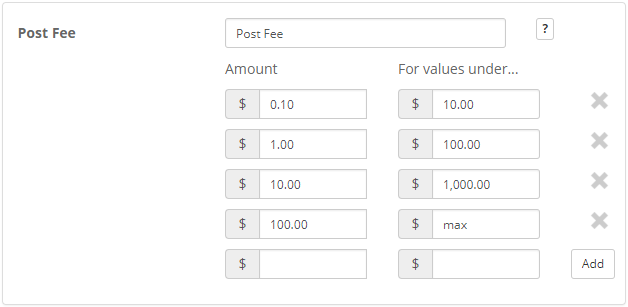
Example:
With the Post Listing fee tiers set to the following values:
For values under $10.00 the fee Amount is $.10
For values under $100.00 the fee Amount is $1.00
For values under $1000.00 the fee Amount is $10.00
For values under (max) the fee Amount is $100.00
If an item is posted with a starting price of $125.00 the Post Listing Fee is going to fall into the $100.01 to $1000.00 tier.
The Post Listing Fee is $10.00.
Seller Final Fee - One of three types of fee structures can be applied to this field to add a final fee that the seller will pay to the site.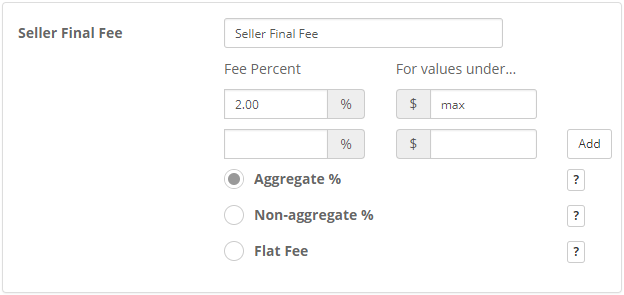
Aggregate % - Based on the amounts entered in each tier, the Seller Final Fee will equal the sum of subsequent percentages up to the final sale price.
Example:
With the Seller Final Fee tiers set to the following values:
$25.00 = 5.0%
$100.00 = 2.5%
max = 1.0%
If an item sells with a final price of $125.00 the Seller Final Fee is calculated as follows:
($25.00 x 5.0%) + ($75.00 x 2.5%) + ($25.00 x 1.0%) = $3.38 Seller Final Fee
If an item sells with a final price of $99.00 the Seller Final Fee is calculated as follows:
($25.00 x 5.0%) + ($74.00 x 2.5%) = $3.10 Seller Final Fee
Non-aggregate % - Based on the amounts entered in each tier, the Seller Final Fee will equal the tier whose dollar value is above but closest to the final sale price.
Example:
With the Seller Final Fee tiers set to the following values:
$25.00 = 5.0%
$100.00 = 2.5%
max = 1.0%
If an item sells with a final price of $125.00 the Seller Final Fee is calculated as follows:
($125.00 x 1.0%) = $1.25
If an item sells with a final price of $99.00 the Seller Final Fee is calculated as follows:
($99.00 x 2.5%) = $2.48
Flat Fee - Based on the amounts entered in each tier, the Seller Final Fee will equal the value of the lowest tier that is higher than the final sale price.
Example:
With the Seller Final Fee tiers set to the following values:
$25.00 = $1.00
$100.00 = $5.00
max = $10.00
If an item sells with a final price of $125.00 the Seller Final Fee is $10.00.
If an item sells with a final price of $99.00 the Seller Final Fee is $5.00.
Buyer Final Fee - One of three types of fee structures can be applied to this field. To disable "Buyer Final Fee" set all tiers to $0 or 0%. Unlike most other site fees, this fee will be added to the Buyer's "Site Fee Invoice" instead of the Seller's "Site Fee Invoice".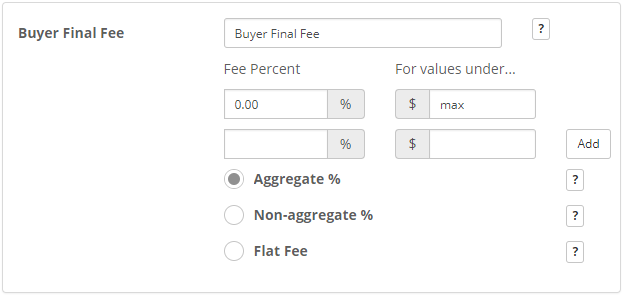
Note: This fee can be used independently from the Buyer's Premium feature, which allows the Seller to specify a % to be added to the Sale Invoice for each sale.
Aggregate % - Based on the amounts entered in each tier, the Buyer Final Fee will equal the sum of subsequent percentages up to the final sale price.
Example:
With the Buyer Final Fee tiers set to the following values:
$25.00 = 5.0%
$100.00 = 2.5%
max = 1.0%
If an item sells with a final price of $125.00 the Buyer Final Fee is calculated as follows:
($25.00 x 5.0%) + ($75.00 x 2.5%) + ($25.00 x 1.0%) = $3.38 Buyer Final Fee
If an item sells with a final price of $99.00 the Buyer Final Fee is calculated as follows:
($25.00 x 5.0%) + ($74.00 x 2.5%) = $3.10 Buyer Final Fee
Non-aggregate % - Based on the amounts entered in each tier, the Buyer Final Fee will equal the tier whose dollar value is above but closest to the final sale price.
Example:
With the Buyer Final Fee tiers set to the following values:
$25.00 = 5.0%
$100.00 = 2.5%
max = 1.0%
If an item sells with a final price of $125.00 the Buyer Final Fee is calculated as follows:
($125.00 x 1.0%) = $1.25
If an item sells with a final price of $99.00 the Buyer Final Fee is calculated as follows:
($99.00 x 2.5%) = $2.48
Flat Fee - Based on the amounts entered in each tier, the Buyer Final Fee will equal the value of the lowest tier that is higher than the final sale price.
Example:
With the Buyer Final Fee tiers set to the following values:
$25.00 = $1.00
$100.00 = $5.00
max = $10.00
If an item sells with a final price of $125.00 the Buyer Final Fee is $10.00.
If an item sells with a final price of $99.00 the Buyer Final Fee is $5.00.
Featured - A flat fee charged when a Seller selects the "Featured" listing enhancement either at listing creation or when edited.
Example: $1.00
Bold - A flat fee charged when a Seller selects the "Bold" listing enhancement either at listing creation or when edited.
Example: $0.15
Sale Badge - A flat fee charged when a Seller selects the "Sale Badge" listing enhancement either at listing creation or when edited.
Example: $0.10
Highlight - A flat fee charged when a Seller selects the "Highlight" listing enhancement either at listing creation or when edited.
Example: $0.25
Subtitle - A flat fee charged when a Seller specifies a listing subtitle either at listing creation or when edited.
Example: $0.75
First Image - A flat fee charged when a Seller uploads the first listing image either at listing creation or when edited.
Example: $0.50
Additional Images - A flat fee charged when a Seller uploads each additional listing image beyond the first either at listing creation or when edited.
Example: $0.25
YouTube Video - A flat fee charged when a Seller specifies a YouTube video either at listing creation or when edited.
Example: $0.75
Post Classified Fee - A flat fee charged when a Seller creates a new Classified listing (which does not require a sale price.)
Example: $0.75
Good 'til Canceled - A flat fee charged when a Seller creates a new listing (fixed price or classified ad) which does not require an end date.
Example: $1.00
