Display
Settings in this section control various aesthetic aspects of the website.
Show Seller Location on Detail Page - When checked, the Seller's City, State/Region and Country from their Primary Address will be displayed on their listings.
Max Results Per Page - Controls the number of results you want to appear on each page.
Note: The default value is 25
Max Home Page Items - Controls the maxim number of items you want to appear on the home page.
Note: The default value is 16
Show Category Counts - When checked, a count of how many active listings exist under each category (including all subcategories) is displayed in parenthesis next to the category name on pages that contain a category navigation section.
Show Zero Count Categories - When checked, category navigation sections will include all categories in the tier, regardless if they contain any active listings. If not checked, only categories with at least one listing under them will be displayed in category navigation sections. This option is essentially used to hide links to empty categories.
Show Seller Name in Search Results - When checked, the Seller's username is displayed below the listing title and subtitle when displayed in search result lists, etc.
Display Listing Type in Search Results - When checked, the listing type will be displayed on the Listing Detail page and on the Listing Results page for both Browse and Search.
Thumbnail Type - When "Cropped" is selected, the image will be made square to fit the listing image display area. When "Scaled to Fit" is selected, the image will be scaled down until the whole image can be displayed.
| Cropped | Scaled to Fit | ||
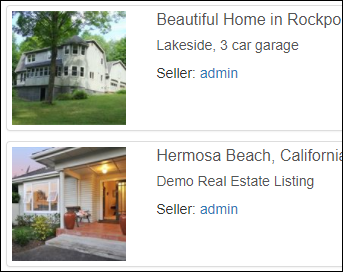
|
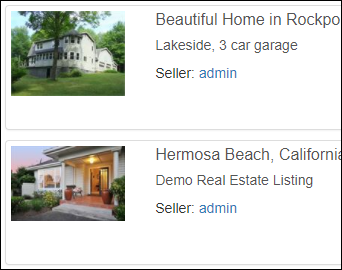
|
Note: Thumbnail Type only affects the thumbnails displayed in lists, not gallery images.
CSS Theme - A few themes have been included for your convenience to be used as-is or as a starting point for your own custom Bootstrap CSS theme design.
Paginate Homepage Events - When checked, events will be shown on the homepage up to the "Max Home Page Items" limit, with page links for the rest.
Default Browse Sort - Select which sort option is used by default when browsing listings.
- Ending Soon
- Newest
Show Categories/Regions on Homepage - When checked, Categories and Regions will appear on the homepage to the left of the homepage featured listings. If unchecked, all eligible events will be shown on the homepage in one list.
Time Remaining Style - This setting determines the formatting of the remaining time when shown on the homepage, browse/search pages and listing/lot detail pages.
-
Classic, e.g. "10 Days, 19 Hours remaining"
-
Active, e.g. "10 Days 19:33:10 remaining"
Default Browse Style - This setting determines the default style to display results on the browse/search pages.
- List, one listing per row with more text
- Grid, a gallery format with larger images
Homepage Content - This setting controls what content is displayed on the home page.
- Default, featured listings
- Browse, all listings
- No listings
Fixed Height Gallery Display - When enabled all gallery items will have a uniform size.
| Fixed Height | Variable Height | ||
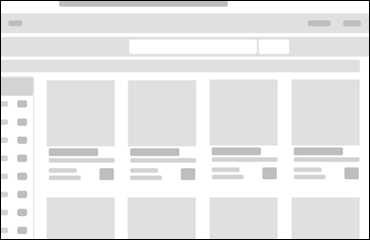
|
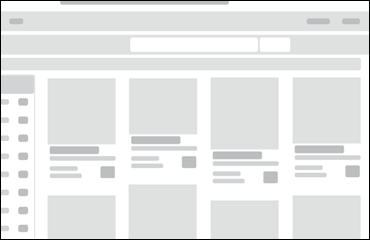
|
