Configuring Stripe for Site Fee Invoices
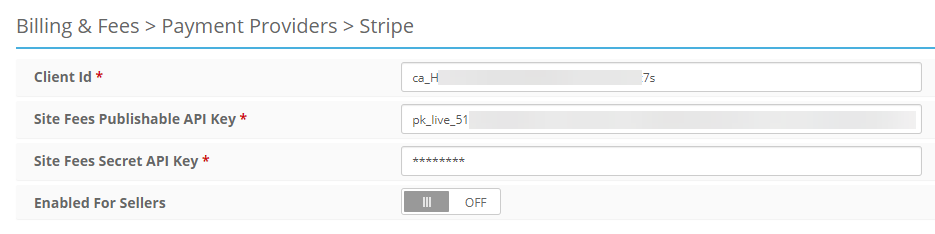
All that is required to use Stripe to collect Site Fees is to have the Stripe Credentials entered into the Admin Control Panel > Billing & Fees > Stripe page.
Optional Credit Card Settings
Admin Control Panel > Billing & Fees > Payment Providers: Require Credit Card for Sellers
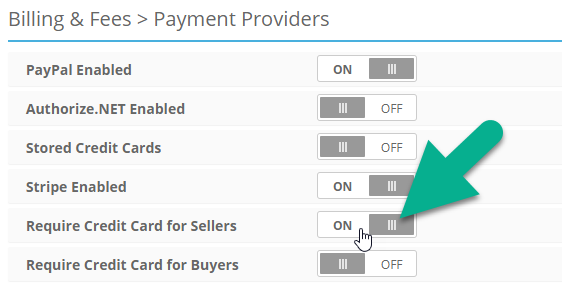
Turning on this setting will check that the Seller has a card on file (with the site's Stripe account) before allowing them to publish an Event.
Admin Control Panel > Billing & Fees > Fee Payment Options: Daily Recurring Batch Payment Processing
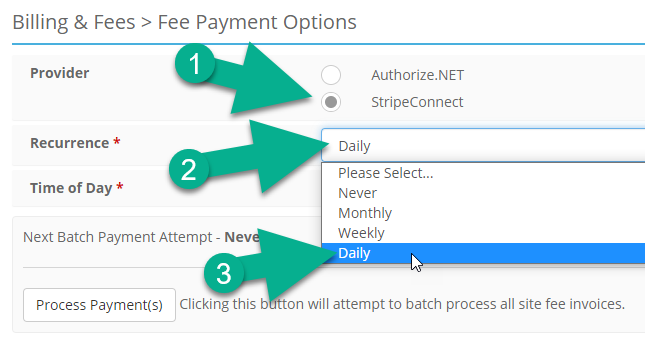
Turning on this setting will attempt to process any unpaid Site Fee invoices at a specified time of day.