Edit Category Detail
This section provides options to refine categories to include specific custom fields and certain listing types. It also allows for adding meta data and content for category browse pages.
Category Name
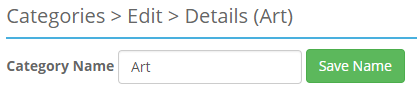
- Category Name - This is the name that will be displayed for this category.
- Save Name - This will save any changes to the category name.
Note
Be sure to click save after editing this field.
Custom Fields
-
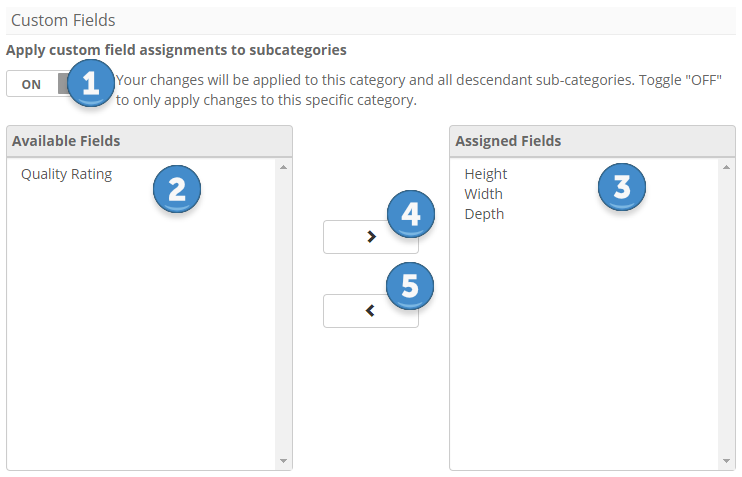
Apply custom field assignments to subcategories - When checked, changes made will apply to all subcategories as well as the selected category.
Note
This setting will not be available if there are not subcategories to apply the changes to.
-
Available Box - This is a list of the Custom Fields available and unassigned to the category.
- Assigned Box - This is a list of the Custom Fields assigned to the category.
- Right Arrow Button - This will move a selected Custom Field from the Available Box on the left to the Assigned Box on the right.
- Left Arrow Button - This will move a selected Custom Field from the Assigned Box on the right to the Available Box on the left.
To add or remove Custom Fields
- Select the custom field you wish to apply to the category.
- Using the arrow buttons, place the desired custom field in the Assigned box to apply it to the category.
- To remove a custom field, select a custom field in the Assigned box and click the left arrow to place it back in the Available box.
Note
Changes to the category will not be inherited by listings that already exist.
Listing Types
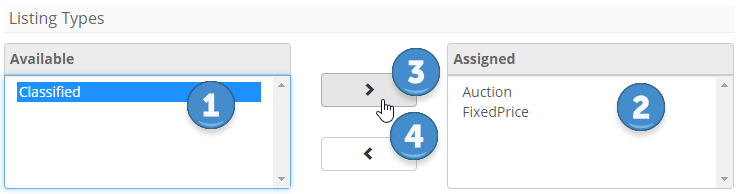
- Available Box - This is a list of the Listing Types available and unassigned to the category.
- Assigned Box - This is a list of the Listing Types assigned to the category.
- Right Arrow Button - This will move a selected Listing Type from the Available Box on the left to the Assigned Box on the right.
- Left Arrow Button - This will move a selected Listing Type from the Assigned Box on the right to the Available Box on the left.
Editing Listing Types
This will change the available options on the Create a Listing form for items sold in this category.
- Select the listing type you wish to change.
- Using the arrow buttons, place the desired listing types in the Assigned box to apply them to the category.
Category Specific Settings
Page Title - This is the page title that the browser will display when viewing this category.
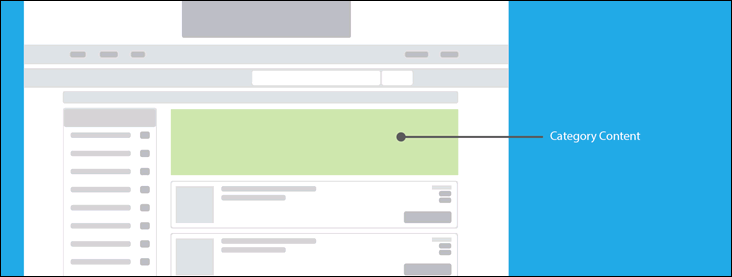
Page Content - This content will be displayed below the header and above the listings when viewing this category.
Meta Keywords - Enter keywords used by search engines for ranking your site's category.
Meta Description - Enter your category description for use by search engines when displaying search results containing a link to your site.
Save Meta Data - Be sure to click save after editing this section.
Note
Not all search engines support Meta Keywords or Meta Description.