Consignor Statements Report
The Consignor Statements Report displays the details of each consignor statement. A consignor statement is generated by the seller and shared with the consignor to list the sales, the listing fees and the consignment fees that the seller is charging the consignor for those sales.
Note
This page is only visible when Enable Consignors is turned on from the Admin Control Panel > Site Preferences > Setup page.
Show Filters - Clicking this button toggles the search fields on and off for each of the searchable columns.
Apply Filters - After entering the search criteria into the filter fields, clicking this button will apply the filters to the report.
Reset Filters - Clicking this button will reset the filters so that the whole list is displayed.
Export CSV - Download the CSV (comma separated value) file containing the consignment statement data. Filters will be applied to the CSV file.
Clicking a blue column title toggles sort by ascending and sort by descending by that column. To search by one or more fields, enter the search parameters into the text box below the column title.
| Icon | Description |
|---|---|
 |
Click this printer icon to open a printing dialogue for a specific Statement |
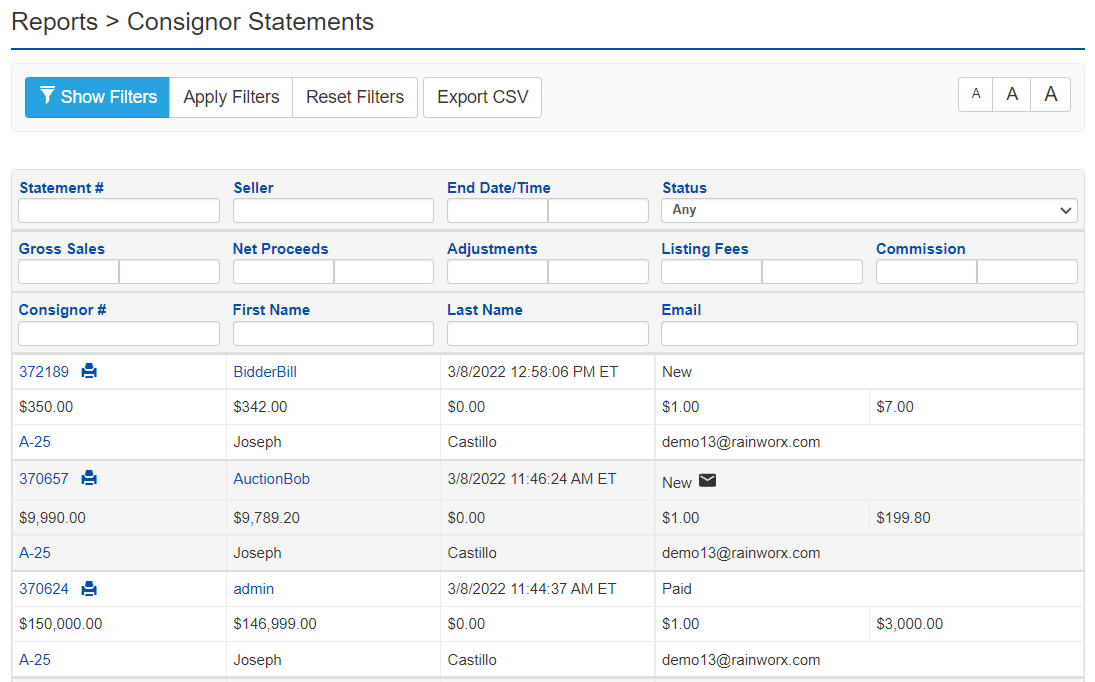
| Name of Field | Type of Information | Description |
|---|---|---|
| Statement # | Integer Value | Statement ID (links to Statement view) |
| Seller | Text | The Seller's user name |
| End Date/Time | Date (Range) | The Date the Statement was generated |
| Status | Dropdown | Any, Paid, Unpaid, Emailed, Not Emailed, Archived (marked New or Paid; Email symbol is displayed if the statement has been emailed) |
| Gross Sales | Decimal Value (Range) | The subtotal before fees are applied |
| Net Proceeds | Decimal Value (Range) | The total after fees are applied |
| Adjustments | Decimal Value (Range) | The subtotal of only the adjustments on the statement |
| Listing Fees | Decimal Value (Range) | The subtotal of only the Listing Fees |
| Commission | Decimal Value (Range) | The subtotal of only the Commission Fees |
| Consignor # | Integer Value | The Consignor number is unique to the Consignor (links to consignor edit page) |
| First Name | Text | The Consignor's first name |
| Last Name | Text | The Consignor's last name |
| Text | The Consignor's email address |