Create User
This section allows the administrator to quickly create a user without having to sign out to go through the registration form.
Note
Even if Require Credit Card on Registration is turned on, this form will not require it. As an admin you have the ability to add this sort of information elsewhere.
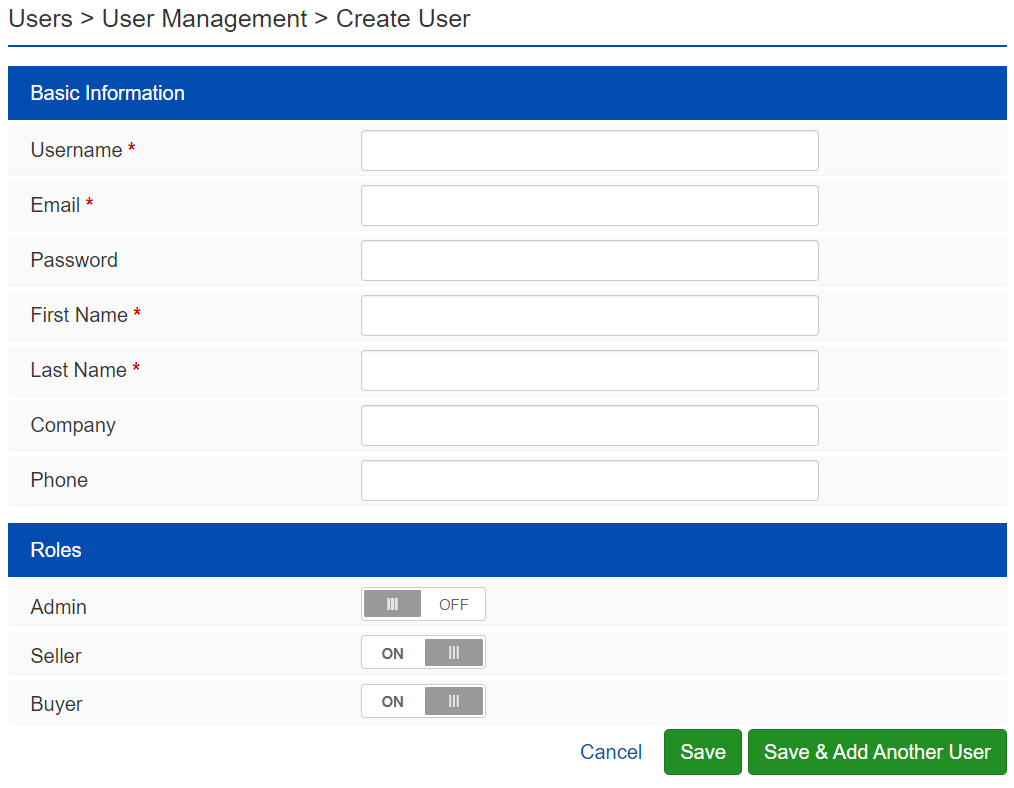
Basic Information
Username – This must be at least 5 characters long.
Email – This should be the user's email address.
Password – This must be 6 characters long and is case sensitive.
First Name – This is the user's first name.
Last Name – This is the user's last name.
Company - This is the user's company name.
Phone - This is the user's phone number.
Note
Custom user fields that are applied to Users Registration will appear here.
Roles
Admin - Make this user an admin user.
Seller - Make this user a seller user.
Buyer - Make this user a buyer user.
Note
Any additional information that needs to be added to this user profile can later be added by editing the user's Account Info in the Admin Control Panel or by Impersonating the user and navigating to their My Account area.
Save - This saves the user and redirects to the new user's Account Info tab.
Save & Add Another User - This saves the user and clears the form so another user can be added.