Site Announcement
This is the Notifications Site Announcement page. This page is used to create a message that you want to send to all of your users or just the users with the Newsletter preference. This email is sent through SendGrid.
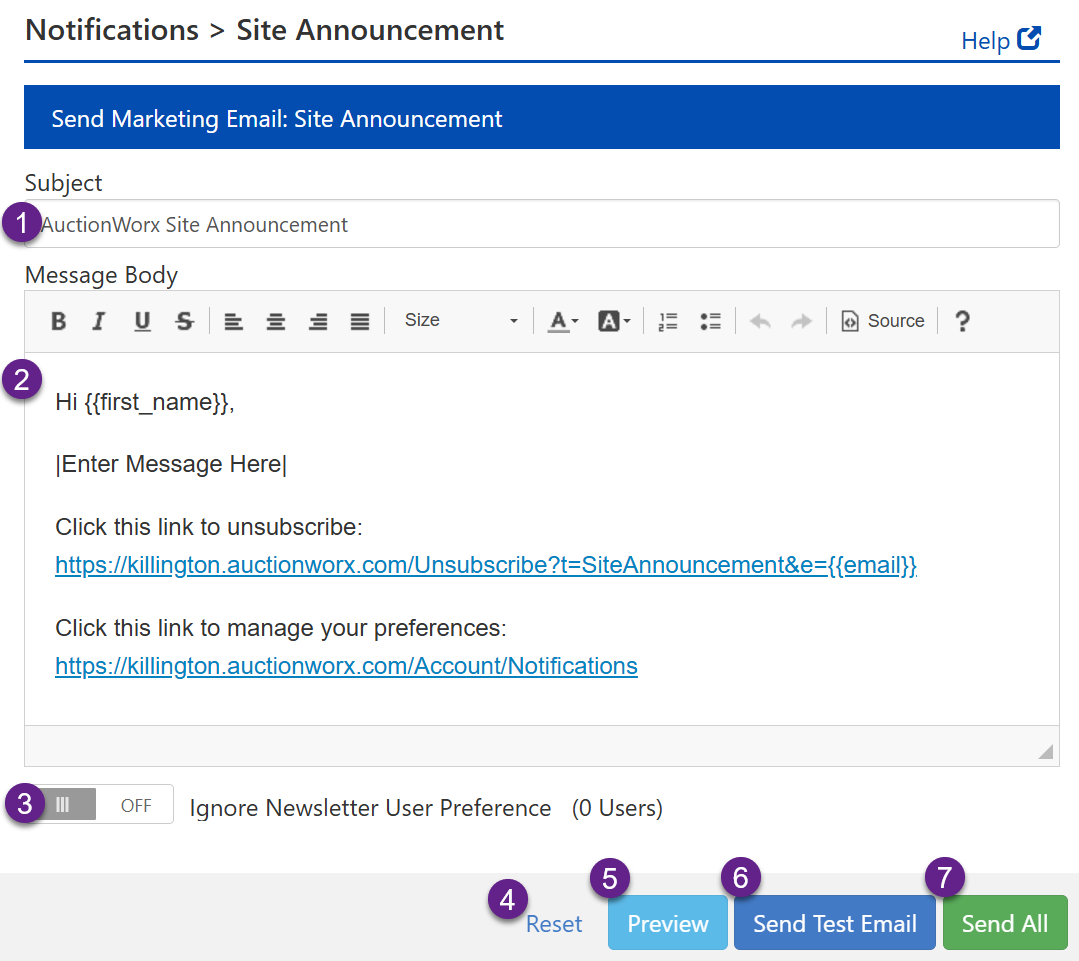
- The Subject of the Site Announcement email that will be sent out.
- The Body of the Site Announcement email that will be sent out.
- The Toggle for sending the Site Announcement to all users or to only users with the Newsletter Preference set to ON.
- The Reset link will refresh the page with only the default information added.
- The Preview button will allow you to see an approximation of how the email will look when a user receives it.
- The Send Test Email will allow you to set only a single email address to receive the Site Announcement email. You will be asked to supply the test email address after clicking the button.
- The Send All button will send the email out to all users according to how #3 is set.