Sales Invoices
The Sales Invoices Report differs from the Sales Transaction Report in that it displays the Shipping, Taxes and Buyer's Premiums.
Clicking the column title toggles sort by ascending and sort by descending. To search by one or more fields, enter the search parameters into the text box below the column title.
Apply Filters - After entering the search criteria into the filter fields, clicking this button will apply the filters to the report.
Reset Filters - Clicking this button will reset the filters so that the whole list is displayed.
The Sales Invoices Report can also be filtered by payment Status:
- All - Both Paid and Unpaid records
- Paid - Only Paid records
- Unpaid - Only Unpaid records
- Shipped - Only records that have been marked shipped on the associated invoice
- Not Shipped - Only records not associated with an invoice that is marked shipped
- Invoice Emailed - Only records from Invoices that were emailed
- Invoice Not Emailed - Only records from Invoices not emailed
Export CSV - Download the CSV (comma separated value) file containing the sales invoice data. Filters will be applied to the CSV file.
| Icon | Description |
|---|---|
 |
Click this printer icon to open a printing dialogue for that specific invoice |
 |
This paid icon signifies if a sales invoice has been marked as paid or not |
 |
This Shipped icon signifies if a sales invoice has been marked shipped or not |
 |
This icon signifies if a sales invoice has been emailed to the buyer or not |
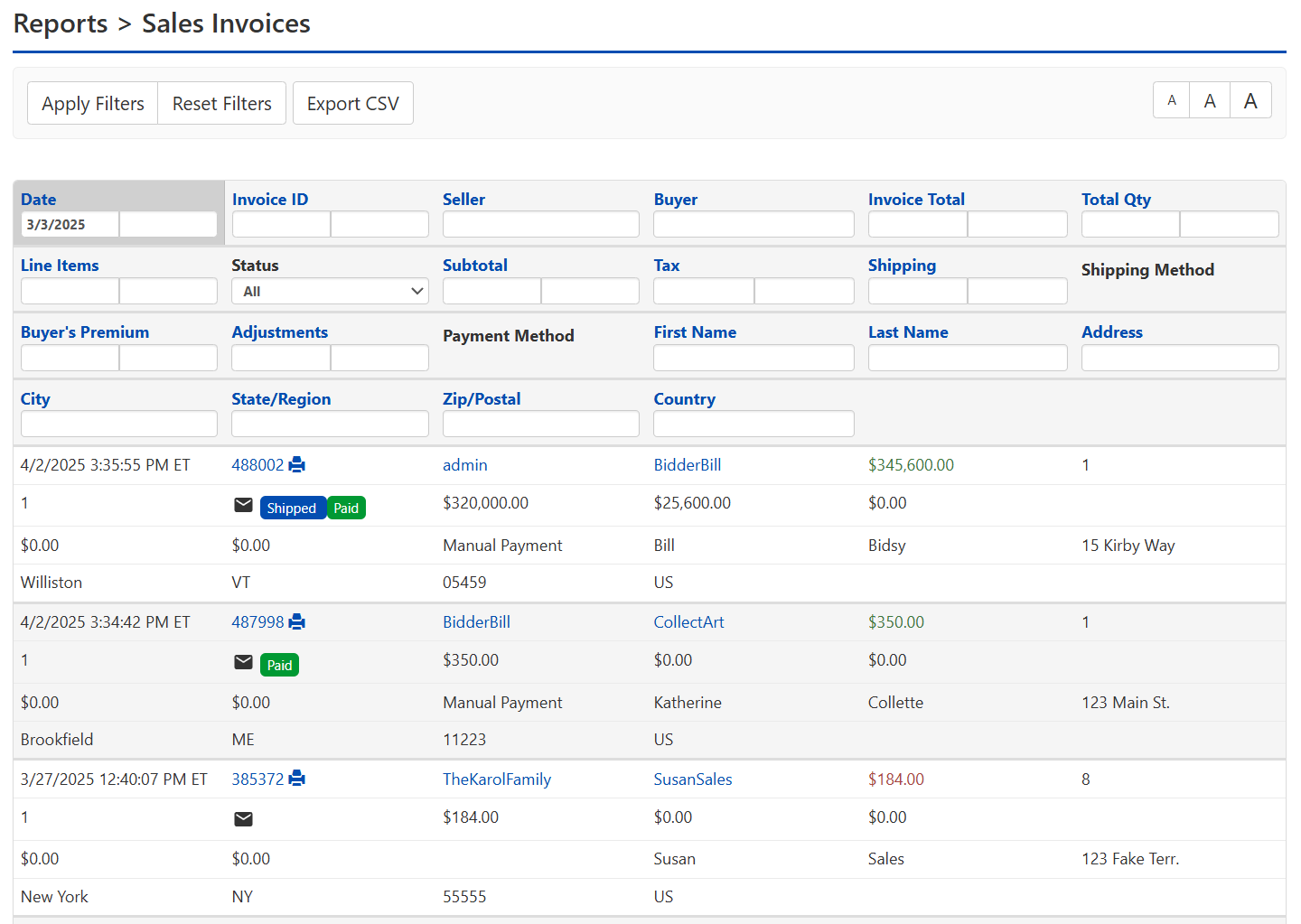
| Name of Field | Type of Information | Description |
|---|---|---|
| Date | Date (Range) | Date the listing fees were charged |
| Invoice ID | Integer Value (Range) | The Invoice ID number is unique to the Invoice |
| Seller | Text | The Seller's username |
| Buyer | Text | The Buyer's username |
| Invoice Total | Decimal Value (Range) | The total amount charged to the Buyer on the Invoice |
| Total Qty | Integer Value (Range) | The number of items on the Invoice |
| Line Items | Integer Value (Range) | The number unique items on the Invoice |
| Status | Symbol/Icon | This is where the Paid or Emailed Icon will appear |
| Subtotal | Decimal Value (Range) | The amount charged before Taxes, Buyer's Premium or Shipping |
| Tax | Decimal Value (Range) | The amount charged for Taxes |
| Shipping | Decimal Value (Range) | The amount charged for Shipping |
| Shipping Method | Text | The name of the Shipping Method used |
| Buyer's Premium | Decimal Value (Range) | The amount charged for Buyer's Premium |
| Adjustments | Decimal Value (Range) | The amount the total was changed through Adjustments, either positive or negative |
| Payment Method | Text | Method used for payment |
| First Name | Text | The Buyer's first name |
| Last Name | Text | The Buyer's last name |
| Address | Text | The Buyer's street address |
| City | Text | The Buyer's city |
| State/Region | Text | The Buyer's state or region |
| Zip/Postal | Integer Value (Range) | The Buyer's zip code or postal code |
| Country | Text | The Buyer's country |