Consignors
The Consignors page is designed for management of all Consignors across the site.
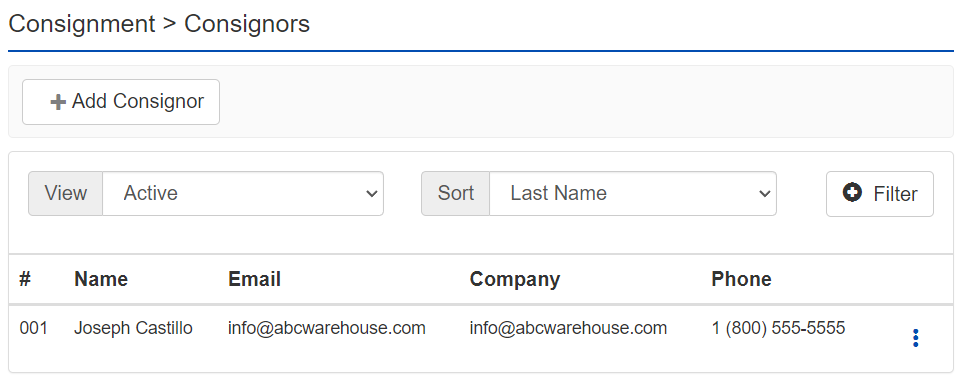
+ Add Consignor - Clicking this button will open the Add Consignor view.
View dropdown:
- Active - Display only consignors that are marked Active (default)
- Inactive - Display only consignors that are marked Inactive
- All - Display both Active and Inactive consignors
Sort dropdown:
- Consignor # - Sorts the list by the Consignor number
- Last Name - Sorts the list by the consignor's last name (default)
- First Name - Sorts the list by the consignor's first name
- Company - Sorts the list by the consignor's company name
- Phone - Sorts the list by the consignor's phone number
Filter:
- Consignor # - Sorts the list by the Consignor number
- Name - Sorts the list by the consignor's last name (default)
- Company - Sorts the list by the consignor's company name
- Email - Sorts the list by the consignor's email address
- Phone - Sorts the list by the consignor's phone number
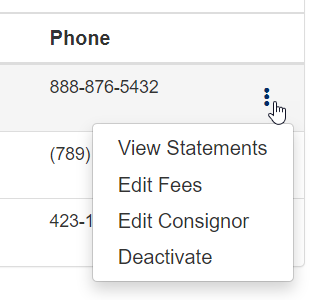
- View Statements - View a list of statements for this consignor
- Edit Fees - Edit the fees that apply to only this consignor
- Edit Consignor - Edit the consignor user details
- Deactivate - Remove the consignor from the Active Consignor list