Custom Content Pages
Create new content pages for your website without the need to edit the underlying code.
Each custom page will have:
- A Unique URL
- A META Title
- Uniform Navigation / Footer Appearance
Creating & Editing Content Pages
Content pages are managed through the Administration Control Panel > CMS > Content area.
New content pages can be created using the form at the bottom of the list of existing content areas.
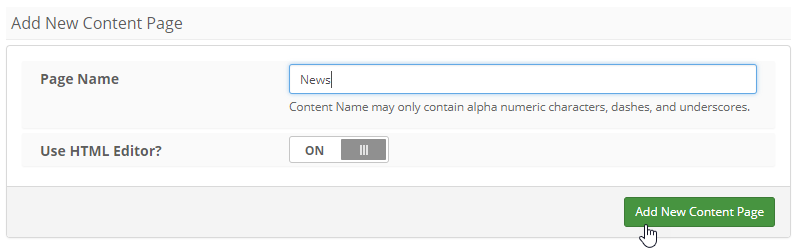
Each new content page will need a name - this name will then become part of the URL.
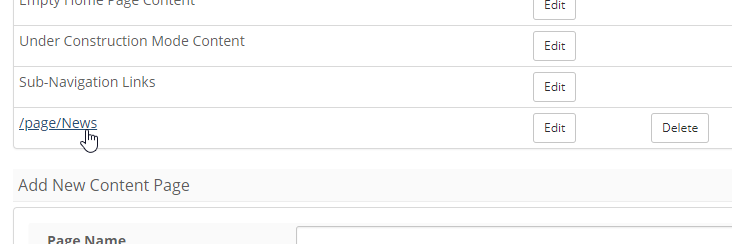
Example
http://www.mydomain.com/page/News
When creating a new content page, you can select to include the HTML editor. The HTML editor is best for custom pages that contain text without any custom HTML code.
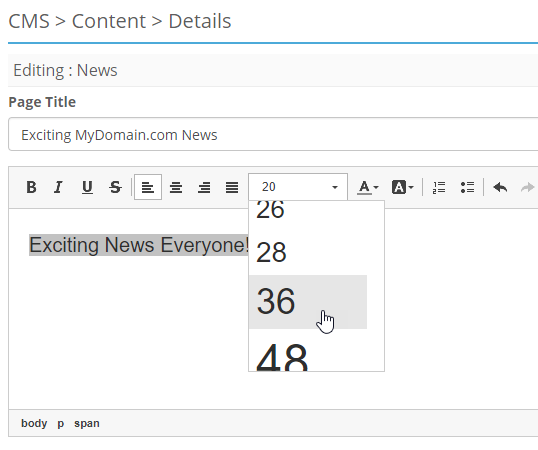
Note
Once a custom page has been created, the HTML editor cannot be turned on or off for this page.
Previewing Custom Pages
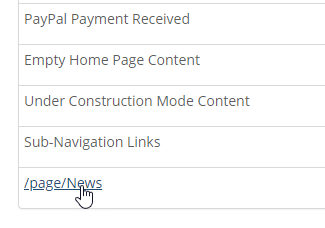
To preview your new content page, click the page name from the main content page list.
The new page will open/appear in a separate tab within your web browser for your convenience.
Linking To Custom Pages
Once your pages have been created and the content added, users will need a way to access them.
Note
Links to these new custom pages are not automatically added to any site navigation menu.
Link Options / HTML Samples
Note
The custom page names ('My-Custom-Page') in this example should be modified to match your custom page name. The "Exciting News" should be replaced with the word(s) that you want to appear for the link.
Example
From within the current website: <a href="/page/News">Exciting News</a>
Example
As a part of the sub-navigation menu (separate content area): <li><a href="/page/News">Exciting News</a></li>